PRIMAL Evolved Creatures: How to Recognize and Tell Them Apart
Wild nameplates in PRIMAL Evolved show a creature's gender, species and level. Learn the named creatures covered here and how to read wild, tamed, downed and bola-restrained states.
Quick answer
Wild creatures in PRIMAL Evolved show a floating nameplate that lists gender, species and level, for example a tag reading Wild Female Parasaur. Read the species text on that tag to tell creatures apart. The named creatures covered here are Parasaur, Parasaurolophus, Mesopithecus and Moschops. Separate cues show the state of the creature: a tamed panel with the owner player name, an Unconscious marker or a Remove Bola prompt.
- Wild: the tag begins with Wild and includes gender, species and level.
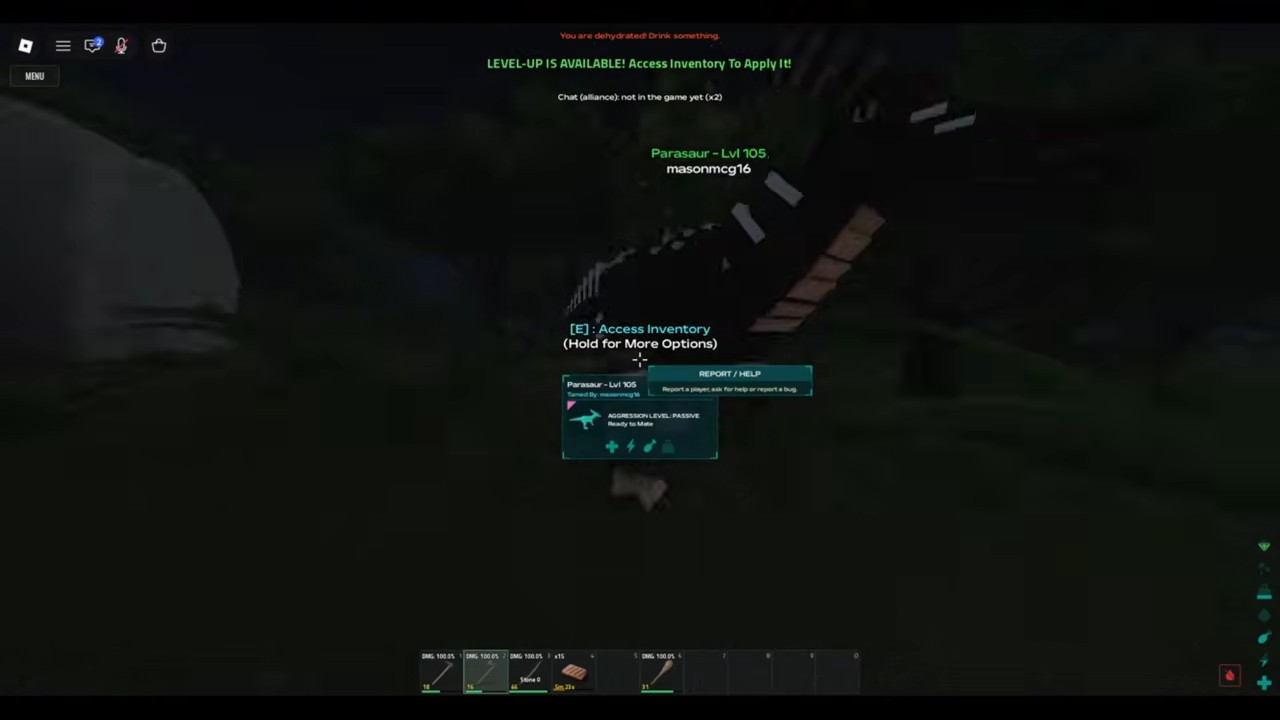
- Tamed: the panel shows the owner player name, and interacting brings up [E]: Access Inventory (Hold for More Options).
- Downed: an Unconscious marker can appear on the nameplate of a wild creature.
- Bola-restrained: the Remove Bola prompt appears with a countdown bar.
The nameplate is the first thing to check. It floats above the creature and carries the species name you need, while separate interface cues tell you whether the creature is wild, tamed, downed or restrained. The sections below explain each field and state, then list the named creatures covered here.
What a wild nameplate shows
On a wild creature, the nameplate reads as one compact line: the word 'Wild', a gender, the species name and the creature's level. Examples from the game include 'Wild Female Parasaur' and 'Wild Female Mesopithecus'. The species word is the part that identifies what you are looking at, so read it in full before you act.
Gender is one of the fields, but the wild tags seen so far all read 'Female'. Treat that as the value on those tags rather than a rule that every wild creature is female.
The species names seen on nameplates include Parasaur, Parasaurolophus and Mesopithecus. Both 'Parasaur' and 'Parasaurolophus' appear as nameplate names, so check the whole species string instead of filling in the rest from the first few letters. The level is another field on the same line; the species text is what separates one creature from another.
Telling wild, tamed, downed and restrained creatures apart
Wild and tamed creatures do not carry the same information. A wild creature has the 'Wild' tag. A tamed Parasaur's panel shows the player name of its owner, and interacting with the tamed creature brings up '[E]: Access Inventory (Hold for More Options)'. That owner name and prompt are the clearest signs that the creature belongs to a player rather than being wild.
In one taming example, a Parasaur followed the player back to the base at night and was parked outside the hut. The observation covers one tamed Parasaur and shows a companion following the player; it is not a rule that every tamed creature follows the same routine.
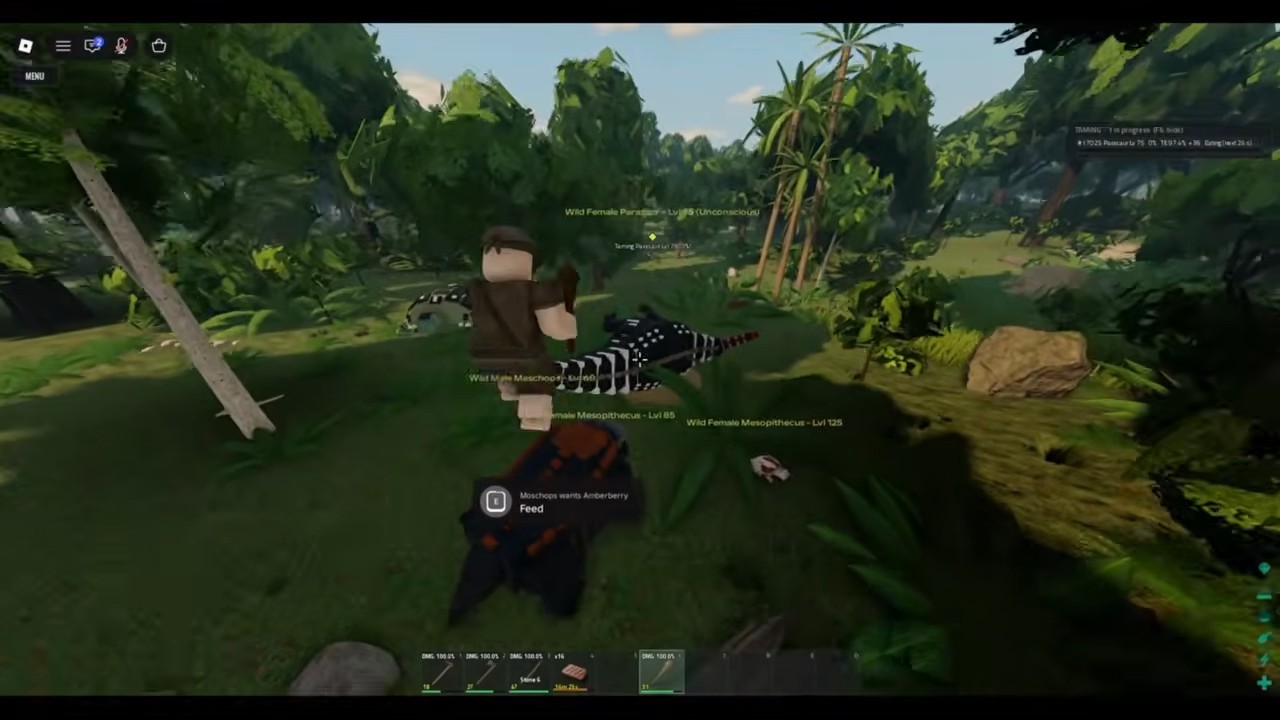
A wild creature can also be downed. One black-striped Parasaur lay unconscious with '(Unconscious)' added to its nameplate while taming progress messages accumulated in the top-right HUD. The marker tells you the creature is unconscious, and the progress messages show that a taming attempt is underway.
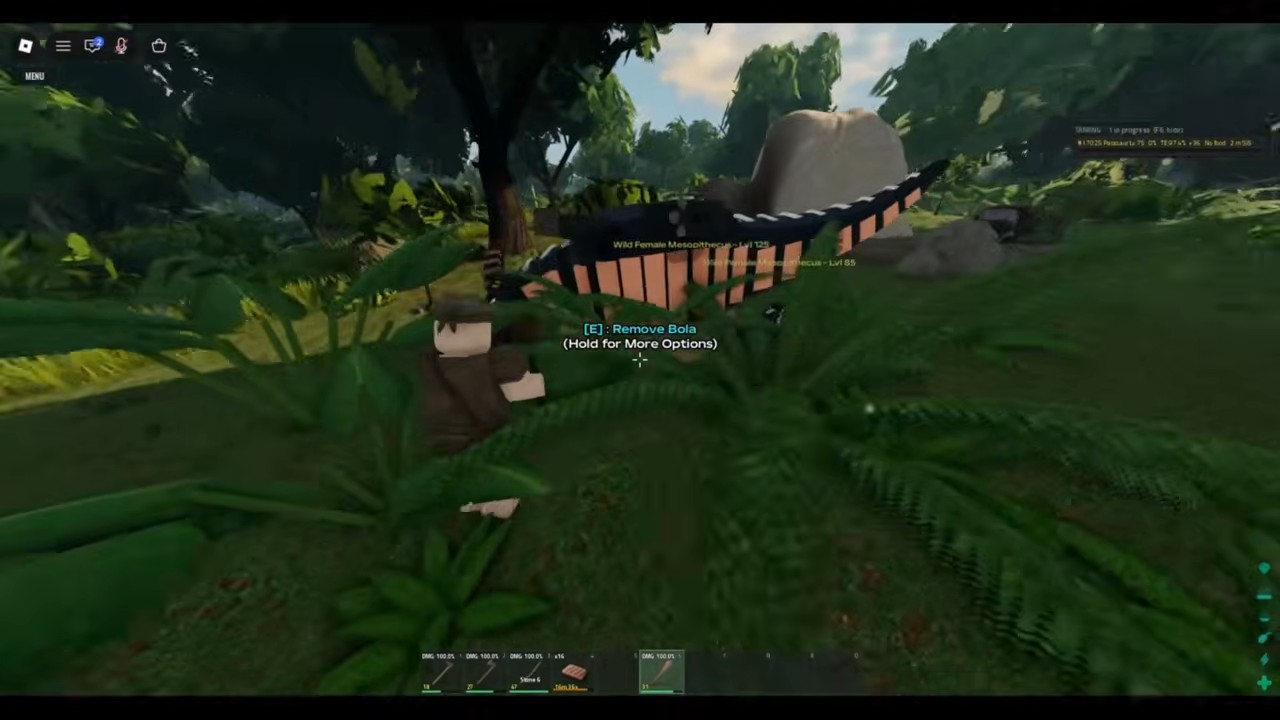
Bola restraint is a different cue again. A restrained creature shows '[E] : Remove Bola / (Hold for More Options)' together with a countdown bar. In the observed sequence, a player also clubbed the restrained creature and dealt melee damage. The distinction matters: this is a restraint prompt, while the '(Unconscious)' text is a nameplate state. Neither cue replaces the species name; the species word still tells you what the creature is.
Named creatures to look for
Named creatures in PRIMAL Evolved
Parasaur
Appears on wild nameplates such as Wild Female Parasaur. A tamed Parasaur panel showed the name of the owner player and the [E]: Access Inventory prompt.
Parasaurolophus
Appears as a nameplate name. Both Parasaur and Parasaurolophus show up as labels, so read the full species word.
Mesopithecus
Appears on wild nameplates reading Wild Female Mesopithecus.
Moschops
Named in a Feed prompt that read Moschops wants Amberberry, which named both the creature and the food item it requested.
The catalog is a starting reference, not a complete roster. It collects the named creatures covered on this page and the label or prompt that named each one.
Reading a creature in practice
- Find the floating nameplate above the creature before you decide what it is. The species word comes from that tag, not from a guess at the body.
- Read the full species word. Parasaur and Parasaurolophus are separate labels that both appear; Mesopithecus is another nameplate name covered here.
- Check the state cues. A leading 'Wild', an '(Unconscious)' marker, a Remove Bola prompt with a countdown bar, or a tamed panel with the owner player name each tells you something different about the creature.
- If a Feed prompt appears, read the whole line. The example 'Moschops wants Amberberry' named both the creature and the item it wanted.
Related pages
For more on the game, see the PRIMAL Evolved beginner guide and the exploration guide. You can also visit the community page.